
One of the most common questions I am asked regarding music notation software note entry is “why can’t I just play in the parts with my MIDI keyboard in one pass in real-time?” Since most people use notation software with the goal of printing scores and parts, you have to approach real-time note entry with care. Here are some tips to playing in real-time with Dorico, Sibelius or other music notation software.
Stack the Deck in your Favor (quantization)
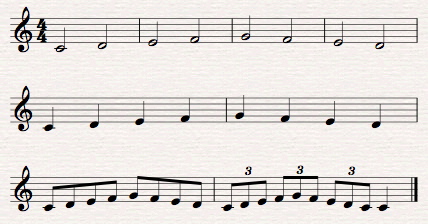
Learn to get under the hood of your software and check the settings when playing in real-time. Sibelius refers to is as Flexi-Time and Dorico as MIDI Entry. I recommend you read the manual, watch the tutorial videos. When you open the settings in Sibelius (Notes Menu > Flexi-time Options) or Dorico (Preferences > Play > Quantization), be sure to set the notation level to the smallest note value in the piece or passage you are playing. For example, in the first example below, the smallest note value is an eighth note. Are there triplets or other tuplets? If not, turn them off. This will make the notation interpretation by the software more accurate.
Metronome Tempo
The metronome setting may also affect your accuracy. Try setting the tempo to a relatively slow tempo. After the notation is entered, you can always speed it up. I have also found that setting the metronome to the eighth note can also help real-time entry accuracy.
MIDI Technique
I am not a keyboard player by trade. I have functional keyboard skills that I use primarily to enter notes into notation software. Music technologist, author, and educator, Don Muro, recommends developing MIDI technique. MIDI technique is not like playing legato, where you connect notes as you play; nor is it like staccato playing where there is a noticeable space between each note. MIDI technique, as Don explained it to me, is playing one note and then immediately playing the next note.
Here are some exercises to help develop your “MIDI technique:”
1. Set the minimum duration to an eighth note; turn off all triplets
2. Set the tempo in a comfortable range, such as 76
3. Play a simple melody with just half, quarter and eighth notes.
If you make mistakes, undo your performance and go back and re-try it.
 With practice, real-time entry may save you time inputting notation into your score.
You can also use your Music Production software to enter the notation, save it as a MIDI file and import it into your notation software. Remember, you can use different entry tools. I personally do 90% of my entry using step-entry, however, if there is a relatively simple passage with very few rests, I may enter it in real-time.
 Making the Most of Notation Software